A couple of weeks ago, Netgear announced that there is a major security vulnerability in several router models that allows anyone within range of your wireless network to log in as administrator without credentials. So many things can go wrong if this happens to you. Even the US-CERT recommends that you don't use the router until you've updated it.
Check your home wireless router. Popular brands include Linksys, Asus, D-Link and Netgear, among others. If your manufacturer is Netgear, check which version you have and update your router with newer firmware asap.
The page listing the models and the steps to update the firmware is here: http://kb.netgear.com/000036386/CVE-2016-582384.
Even if you don't have a Netgear router, it is always a good idea to log in to your router occasionally to see if it needs a firmware update. Or set a Google alert that queries the manufacturer's name and model. Add the word "firmware" to your query and configure it to deliver a notification to you whenever there is new information available on the Internet.
For more information, see the Forbes article here: http://www.forbes.com/sites/leemathews/2016/12/12/these-netgear-routers-are-scarily-easy-to-hijack/#1f89ad0d9537.
Wednesday, December 28, 2016

Saturday, December 17, 2016
Advice if you use Yahoo: Don't.
By now the world knows about the one billion Yahoo accounts breached over the past three years. The best advice I've seen from the experts this week is "get rid of your Yahoo account." Likewise, if you have an account with Yahoo partner AT&T, consider cancelling that as well.
Tips for moving away from Yahoo:
- Back up your Yahoo data like old emails, contacts, calendar entries and photos. This includes Flickr photos. See instructions at: https://help.yahoo.com/kb/download-save-info-lose-good-sln15129.html.
- Delete your Yahoo folders.
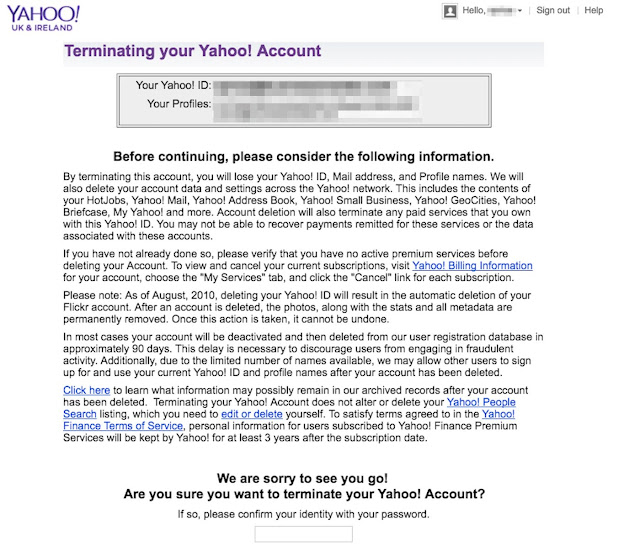
- Navigate to the Delete Your Account page at https://login.yahoo.com/?.done=https%3a%2f%2fedit.yahoo.com%2fconfig%2fdelete_user%3f.scrumb%3d0, and terminate your Yahoo account (see screen shot below). This can take up to 90 days to process.

After successfully terminating your Yahoo account:
- If you have ever used your Yahoo password for other sites–which is always a bad idea–change the password and security questions for those accounts. For sites holding really sensitive data (banking, insurance, taxes, medical, etc.), consider modifying your user name as well by appending or prepending it with a few characters, numbers or symbols (where allowed).
- If you have mobile phone number associated with your Yahoo account, and you still subscribe to that number, then you may be more prone to SMS phishing (a.k.a. smishing). Be on the alert for smishes and don't click links in text messages.
- Open a Gmail account.
Sunday, December 11, 2016
Don't get hacked this holiday season!
The holiday season is here. This is the time of year when scam artists are operating at full-tilt. Half of shoppers are buying gifts online this year. I've blogged about this in the past. This post is simply a reminder to be on your toes and to not share information about yourself with anyone who calls or emails you.
For tips in preventing identity theft and online scams, see the StaySafeOnline.org article Hackers Love the Holidays Too: How to Protect Yourself from Information and Identity Theft, summarized here.
Remember: Stop. Think. Do not click.
For tips in preventing identity theft and online scams, see the StaySafeOnline.org article Hackers Love the Holidays Too: How to Protect Yourself from Information and Identity Theft, summarized here.
- Avoid making purchases when using public Wi-fi.
- Never clicks links in unexpected, unusual or out-of-character emails - navigate to the web site directly from your browser. Just because an email looks like it is from someone you know doesn't mean it is legitimate.
- Never download or open attachments sent to you in email.
- Use anti-virus software and activate the firewall on your operating system.
- Delete unused accounts on web e-commerce and other sites where possible.
Remember: Stop. Think. Do not click.
Wednesday, November 23, 2016
Watch out: ɢoogle.com isn’t the same as Google.com
It isn't unusual for bad guys to buy fake domain names that resemble real ones. Often they use simple character substitution.
For example, in h0medep0t.com, you'll notice there is a zero (0) where there should be a letter O. Although this example looks pretty obvious, often we don't take time to scrutinize what's in the address bar of the web browser.
Or, we jump to the link without looking closer, such as in an email or a text message where the real URL doesn't match up with the link displayed. In most email programs, like Microsoft Outlook, you can hover over the displayed link with your mouse cursor to see the actual web location that the link redirects you to—the URL—but this feature isn't available in all operating systems or in all email clients. You won't necessarily have this ability on your smart phone or web email client, for example.
This is why I don't click links sent to me—even from people I know—without scrutinizing them first. Here is a PCWorld article with more information about validating links: http://www.pcworld.com/article/248963/how_to_tell_if_a_link_is_safe_without_clicking_on_it.html.
Here is more about the Google scam. Scammers use a domain name that looks like Google.com but isn't: ɢoogle.com. Look at the "G." It isn't a standard letter that you'd type on a keyboard. It is actually a symbol, which uses a different character set. International (or extended) characters like this one are rendered on your computer screen by typing a specific combination of keys and numbers on a standard keyboard.
For more info, do a web search on the phrase "character set."
Here is the full article about the bad ɢoogle.com:
http://www.analyticsedge.com/2016/11/heres-a-secret-%C9%A2oogle-com-is-not-google-com/.
For example, in h0medep0t.com, you'll notice there is a zero (0) where there should be a letter O. Although this example looks pretty obvious, often we don't take time to scrutinize what's in the address bar of the web browser.
Or, we jump to the link without looking closer, such as in an email or a text message where the real URL doesn't match up with the link displayed. In most email programs, like Microsoft Outlook, you can hover over the displayed link with your mouse cursor to see the actual web location that the link redirects you to—the URL—but this feature isn't available in all operating systems or in all email clients. You won't necessarily have this ability on your smart phone or web email client, for example.
This is why I don't click links sent to me—even from people I know—without scrutinizing them first. Here is a PCWorld article with more information about validating links: http://www.pcworld.com/article/248963/how_to_tell_if_a_link_is_safe_without_clicking_on_it.html.
Here is more about the Google scam. Scammers use a domain name that looks like Google.com but isn't: ɢoogle.com. Look at the "G." It isn't a standard letter that you'd type on a keyboard. It is actually a symbol, which uses a different character set. International (or extended) characters like this one are rendered on your computer screen by typing a specific combination of keys and numbers on a standard keyboard.
For more info, do a web search on the phrase "character set."
Here is the full article about the bad ɢoogle.com:
http://www.analyticsedge.com/2016/11/heres-a-secret-%C9%A2oogle-com-is-not-google-com/.
Saturday, November 19, 2016
Beware fake phone calls from "customer service"
It cannot be said enough: hang up on callers whom you do not know, especially if they are trying to elicit any information from you. Better yet, if you don't recognize the phone number of the caller, don't pick up. Scam artists are less likely to try again if you're not answering.
Protect yourself and your employer by taking advantage of Caller ID service on your phone. Personally, if a call comes in to my cell phone from an unknown number, I let it go to voice mail.
It seems there is a new phone scam every day. Reported by Trustwave this week is a ruse that targets hotel and restaurant chains. This scam is perpetrated by a known cyber criminal gang that employs very convincing social engineering techniques like name-dropping and familiarity with other "insider" knowledge about your org chart.
When the caller reaches the hotel or restaurant's customer service line by phone, he/she claims to be a client who cannot log in to the reservations system. The caller may claim to know your boss or C-level executive.
Remember that this type of information about your company is available on the web to anyone. It takes little effort to mine LinkedIn profiles and gather intelligence about your organization's personnel structure.
An email is sent to the customer service rep with a malicious Microsoft Word document attached. When clicked, malware is executed behind the scenes that provides access to the company's credit card database and other sensitive information.
Click here for the story: This malware attack starts with a fake customer service call. When in doubt, just hang up!
Protect yourself and your employer by taking advantage of Caller ID service on your phone. Personally, if a call comes in to my cell phone from an unknown number, I let it go to voice mail.
It seems there is a new phone scam every day. Reported by Trustwave this week is a ruse that targets hotel and restaurant chains. This scam is perpetrated by a known cyber criminal gang that employs very convincing social engineering techniques like name-dropping and familiarity with other "insider" knowledge about your org chart.
When the caller reaches the hotel or restaurant's customer service line by phone, he/she claims to be a client who cannot log in to the reservations system. The caller may claim to know your boss or C-level executive.
Remember that this type of information about your company is available on the web to anyone. It takes little effort to mine LinkedIn profiles and gather intelligence about your organization's personnel structure.
An email is sent to the customer service rep with a malicious Microsoft Word document attached. When clicked, malware is executed behind the scenes that provides access to the company's credit card database and other sensitive information.
Click here for the story: This malware attack starts with a fake customer service call. When in doubt, just hang up!
Sunday, November 6, 2016
Election scams - Don't fall for them
It is officially election week in the United States. This opens up lots of opportunities for social engineers and crooks to take advantage of voters. Emotions are high right now, making it tough for us to be at our best, but this is exactly the time to be vigilant.
Be on the lookout for online scams and, as a rule, just don't click. Phone scams abound too—just hang up.
For example, if you receive a message inviting you to vote by texting, forget it. Delete the message. You can't sit in your living room and click a link to vote—at least, not this year. You also cannot vote by phone.
Stay on the lookout for last-minute "urgent" messages saying that your voter registration has expired or your polling station has moved. Ignore requests for last-minute donations to win the election in your party's favor.
Another good way to be duped is through fake email messages purporting to deliver the latest election results. Do not click links or attachments! If you want to know the latest, navigate to your favorite news site in your web browser, or turn on your TV. Don't ever expect emailed or texted links about news articles to be legitimate.
For more information, see the November 3 Huffington Post article: Watch out for these last-minute election scams.
Stop. Think. Do not click!
Be on the lookout for online scams and, as a rule, just don't click. Phone scams abound too—just hang up.
For example, if you receive a message inviting you to vote by texting, forget it. Delete the message. You can't sit in your living room and click a link to vote—at least, not this year. You also cannot vote by phone.
Stay on the lookout for last-minute "urgent" messages saying that your voter registration has expired or your polling station has moved. Ignore requests for last-minute donations to win the election in your party's favor.
Another good way to be duped is through fake email messages purporting to deliver the latest election results. Do not click links or attachments! If you want to know the latest, navigate to your favorite news site in your web browser, or turn on your TV. Don't ever expect emailed or texted links about news articles to be legitimate.
For more information, see the November 3 Huffington Post article: Watch out for these last-minute election scams.
Stop. Think. Do not click!
Wednesday, October 12, 2016
IRS form CP2000 scam and Hurricane Matthew scams
If
you receive an email with an IRS CP 2000 form and a claim that the
income reported on your tax return does not match the income reported by your
employer, it is a scam. The message may also indicate that your issue is related to the
Affordable Care Act.
Of course, the IRS will never initiate contact with you to
collect overdue taxes by email, text message or phone call. If you receive such a text or email, don’t respond. If they call, hang up. If
you receive a CP 2000 form in the U.S. mail and you question whether it’s legit, call
the IRS at 1-800-366-4484.
Also,
watch out for scam and malware messages related to the hurricane. One bogus
email that is being distributed now claims that you can click a link to find out about power
outages in your area. Other Hurricane Matthew related malware messages
may be distributed in the coming days and weeks, including requests for
donations. Emails or social media posts may offer links to read news reports
about the hurricane. Even if these messages appear to come from CNN or another
news outlet, don’t trust them. Stay alert!
Subscribe to:
Posts (Atom)